

The platinum Apple IIe is, feature-wise, nearly identical to the original beige Apple IIe. The most visible difference is the addition of the numeric keypad. The platinum model was created to provide a model of the IIe that would be easier to upgrade to an Apple IIGS; by integrating a keypad, users wouldn’t be as likely to require an ADB keyboard to use their upgraded system.
Photo Tour
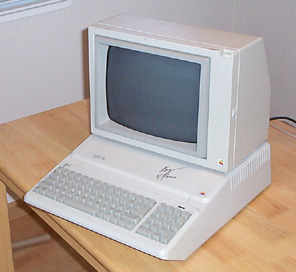
Another difference is a reduced chip count on the motherboard. There’s only one ROM chip and two RAM chips instead of eight. The platinum IIe shipped standard with a 64K 80-column card in the auxiliary slot, bringing the total standard memory up to 128K.
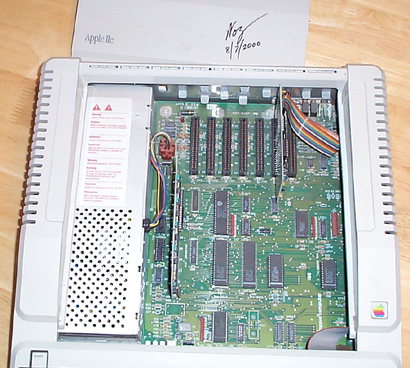
In the picture above, the card in the front-left corner of the visible part of the motherboard is the 64K/80-column card that ships standard with this machine. If it’s missing, your platinum IIe only has 40-column text, no double-hires graphics, and is limited to 64K of memory.
This particular unit has a card in slot 6; this is a 5.25″ disk controller card. The 5.25″ disk controller is typically put in slot 6, although technically it could go anywhere. Some software, however, assumes it’s in slot 6, so that’s where you should put it.
The Apple IIe has seven slots; however, slot 3 is basically useless, except for specific cards that say they support being installed in that slot. These are typically certain memory cards, video enhancement cards, and accelerator cards.
However, any software that will run on the original Apple IIe will run on the platinum model, and vice versa. The two are indistinguishable from software.

The back of the platinum IIe is essentially the same as the beige model. As is standard for the Apple ][, ][+, and IIe models, there are very few integrated ports but lots of knock-outs so you can add ports using expansion cards.
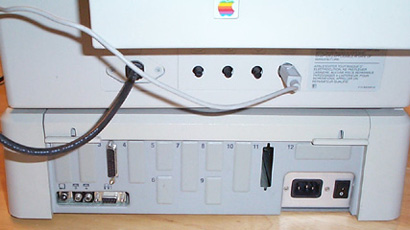
At the bottom left of the back panel are the video, cassette in and out, and joystick ports.

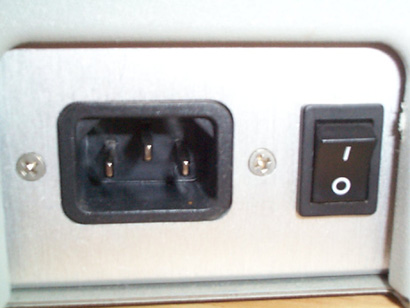
At the bottom right corner of the back panel are the power input and power switch.
Hardware you need
At a minimum, you’ll need the Apple IIe itself, a composite monitor, a disk controller card, and a disk drive for that card.
You’ll definitely want at least one, preferably two 5.25″ floppy drives. Nearly all Apple IIe-compatible software is either shipped on or intended to be run on 5.25″ disks. There are two types of controller card for the Apple IIe.
The Disk ][ Controller was the original Apple II 5.25″ disk drive standard. It uses a 20-pin rectangular connector on a ribbon cable to connect the drives to the controller card inside the computer.
The Apple 5.25″ Disk Controller, which is what’s installed in the computer we’ve pictured here, uses the same 19-pin connector used by the Apple IIGS, and you plug the same drives into it.
Both of these cards only support 5.25″ disks. You must use double-density floppies, and only one side of the disk is used (if you know what you’re doing, you can use both sides of a double-sided, double-density disk, but that’s beyond the scope of this overview). The disks created using these different controller cards and drives are entirely compatible with each other—in fact, with an adapter, the drives can even be used on the other type of controller.
Both cards can support up to two drives. You can install multiple controller cards if you need more drives.
You can, optionally, install a 3.5″ disk drive controller card, SCSI card, Focus hard disk-on-a-card, and assorted other hardware, but the above hardware will get you started.
Accessories you need
You’ll need an RCA video patch cable to connect the Apple IIe to the composite monitor, and a standard computer power cable to plug the computer in.
If you want blank disks, you’ll need double-density 5.25″ disks. High-density disks will not work in Apple II disk drives.
Software you need
Minimally, you’ll need a copy of the Apple II system software you wish to use on your Apple IIe. Typically, this will be the latest version of ProDOS 8. You can buy the current version of ProDOS 8from the Byte Works for US $14. This includes both a 3.5″ and a 5.25″ disk.
If you’d rather use the older Apple DOS 3.3 operating system, Byte Works can sell you that too, including a manual, for US $20.